.png)
Restart your PC with your chosen Operating System
Restart is a nice, free Windows software, that belongs to the category Software utilities with subcategory Task Bar, Start Menu & Explorer (more specifically Startup & Shutdown Utilities).
More about Restart
The current version of the program is 1.56 and the latest update happened on 2/5/2006. It's available for users with the operating system Windows 95 and previous versions, and it is available in English.
Since the software was added to our catalog in 2005, it has obtained 10,908 installations, and last week it had 11 downloads.
Restart is a pretty light software that does not require as much free space than most software in the category Software utilities. It's a very popular software in United Kingdom, Czech Republic, and Germany.
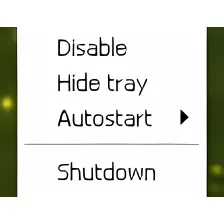
Added option for disabling the program from running at startupFixed bug that caused the -f command line option to display a diagnostic message
Changes
Added option for disabling the program from running at startupFixed bug that caused the -f command line option to display a diagnostic message





























User reviews about Restart
Have you tried Restart? Be the first to leave your opinion!